
Six AWS Accounts Were Enough: Designing a Multi-Account Architecture That Fits the Business
A good AWS multi-account setup protects the business and lets teams work effectively. Production should be well isolated. Developers need safe places to make changes. Security teams need to see across everything. The structure should also be easy for operators to manage.
On an e-commerce platform I built, one AWS environment supported several storefronts, product lines, and marketing campaigns. It connected to payment providers, warehouses, shipping, and accounting systems. We used AWS Control Tower with six accounts: Management, Security / Audit, Log Archive, Production, Staging, and Development.
This setup kept live operations apart from development and testing, gave security its own space, and stored audit records away from daily admin tasks. GitHub Actions managed CI/CD, Cloudflare managed DNS, and experiments happened in Development.
This article explains the choices behind that setup, starting with a simple startup base, then the e-commerce example, and finally some enterprise suggestions. At each step, I look at the business need, the risks, and the extra work each new account brings.
Start With Business Needs
An account structure should match how the business builds, runs, and protects its products. In e-commerce, these needs are clear. Developers launch new storefronts for campaigns, customers expect checkout to always work, and all integrations must keep running as the product changes.
Before setting account boundaries, I ask five questions.
- Could a development mistake affect production? Consider deployment errors, broad permissions, accidental data deletion, and competition for shared quotas.
- Who should manage infrastructure and access data? Developers, operations teams, security staff, and external partners may need different permissions.
- Which workloads have independent owners and release cycles? Separate responsibilities can justify separate account boundaries.
- What requires stronger isolation? Sensitive data, contractual obligations, and the business impact of a failure can justify additional separation.
- What can the team realistically maintain? Every account brings access management, monitoring, baseline configuration, and lifecycle work.
For a small team, the last question directly affects how much they can deliver. Someone has to look after each boundary, know its dependencies, and fix things when they break. A new storefront might fit in an existing account, but a workload with different owners or risks may need its own.
Why Account Boundaries Matter
When a business relies on an application, development work should have minimal chance to impact live operations. Deployments meant for staging, broad permissions, or compromised credentials should all stay contained.
AWS Well-Architected covers this in SEC01-BP01, which recommends separating workloads using accounts. It recommends keeping environments and workloads in different accounts for security, access, and billing. For e-commerce, this meets a basic need: developers can change and test the product while customers keep placing orders.
Separate accounts create several helpful boundaries.
- Environment isolation. Access to Development does not automatically provide access to Production.
- Containment of mistakes and compromise. Permissions scoped to one account help limit the impact of an incorrect deployment or stolen credential. Cross-account access must be explicitly authorized and carefully restricted.
- Ownership and financial accountability. Accounts can align infrastructure permissions, operational responsibilities, and cost reporting with a product or team.
- Quota separation. Many service quotas and API rate limits are set per account, often by Region. Using separate accounts can reduce competition for these limits between environments. You still need to check each quota’s scope.
- Different organizational controls. Production can have tighter restrictions than Development, but both still follow a shared security baseline.
AWS describes these benefits in its multi-account strategy guidance. Benefits of using multiple AWS accounts
Following those principles, I use account separation to give teams autonomy within clear operational boundaries. Development teams can move quickly, while production access and organization-wide controls remain tightly managed. The value comes from aligning those boundaries with business responsibilities and explicitly controlling the dependencies that cross them.
Account and VPC Boundaries Serve Different Purposes
I often see clients think that putting Development and Production in separate VPCs is enough isolation. While separate VPCs help with network access, they don’t create separate boundaries for resource ownership or admin permissions.
For example, if development and production databases are in separate VPCs but the same account, their network paths are isolated. However, a deployment role with account-wide permissions could still change or delete resources in both environments using AWS APIs. VPC separation alone doesn’t limit that role’s admin rights.
Putting environments in separate accounts adds more protection. A role in Development would need specific cross-account access to work with production resources. IAM policies, trust policies, resource policies, and organizational controls all decide if that access is allowed.
I separate environments and responsibilities using account boundaries, then set up network access based on what the application needs to communicate.
Establish the Foundation With AWS Control Tower
Once you set account boundaries, the team needs a consistent way to manage them. Setting up access, logging, and controls in each account separately leads to extra work and possible inconsistencies.
I suggest starting with AWS Control Tower. It gives you a landing zone, which is a managed base for organizing accounts, applying controls, and standardizing how you set up accounts. This repeatable approach to governance lets the team spend more time on the product.
Separate Governance From Workloads
I built the foundation around a few key responsibilities.
- Management account. This manages AWS Organizations and Control Tower, including setting up accounts and governance. I use it only for admin tasks and keep privileged access tightly controlled.
- Security / Audit account. This is a dedicated space for security oversight and, if set up, delegated admin of security services.
- Log Archive account. This stores all audit logs in one place, keeping their retention and protection separate from daily admin tasks.
- Organizational units. These group accounts that need the same controls. Production and non-production accounts can have different restrictions without having to manage every policy for each account.
These responsibilities create distinct boundaries for workload administration and security oversight. Their implementation depends on the landing zone configuration and enabled integrations. AWS Control Tower shared accounts
Configure the Foundation Around Requirements
Control Tower Landing Zone 4.0 lets you configure service integrations like AWS Config, centralized CloudTrail logging, security roles, and AWS Backup. Some integrations rely on others. For example, AWS Config in member accounts needs the right OU baseline. So, you need to clearly set and check your configuration.
In these architectures, centralized audit logging and security oversight are key parts of the foundation. Other integrations and controls depend on what you need for data protection, recovery, delivery, and operations.
IAM Identity Center gives workforce access using groups and permission sets. Baselines set up common resources and settings. Preventive, detective, and proactive controls handle specific risks at different stages of the resource lifecycle.
Control Tower manages the landing zone features the team turns on. The team is still responsible for app architecture, workload permissions, network setup, deployment security, monitoring, and incident response.
Startup: Keep the Structure Small and Explicit
A startup needs to launch fast, protect production, and keep infrastructure simple for a small team. I start with a small setup where each account has a clear job.
| Account | Purpose |
|---|---|
| Management | Organization and landing zone administration with tightly restricted access |
| Security / Audit | Centralized security oversight and administration of the security services in use |
| Log Archive | Audit logs stored separately from workload administration |
| Production | The live product and its data |
| Development | Implementation, testing, and controlled experiments |
| Staging, when required | A stable environment for release and integration validation |
From my experience building products and advising startups, Development and Production are often enough as environments. Development also acts as the shared test space. Changes go there first, get tested, and then move to Production. For a small team aiming for product-market fit, this setup works well when speed matters most.
LLM-assisted development and coding agents can speed up this cycle. Changes from pull requests can be deployed to Development as soon as they are merged, with automated checks and agents helping to test the resulting behavior. The team still needs clear release criteria and accountability for what reaches Production.
The trade-off is that Development is a moving target. New changes can interrupt testing or make it harder to validate a specific release. I introduce a separate Staging account when the business needs a stable environment for acceptance testing, coordinated releases, or external integration validation.
Keep Related Components Together
If components have the same owner, security needs, and release process, they can stay together in the same environment account.
Multiple storefronts might share the same commerce backend and be managed by one team. Just having different domains or marketing campaigns isn’t enough reason for separate accounts. I’d reconsider if a storefront got its own owner, very different access needs, or needed to isolate failures.
Adding more boundaries means extra work for deployment permissions, cross-account access, monitoring, and setup.
Add Supporting Accounts When Their Purpose Is Clear
- Network: Set up a dedicated account if you need shared connectivity, centralized inspection, or a separate owner for the network.
- Shared Services: Create a separate account when several workloads or teams rely on services that have their own owner and lifecycle.
- Sandbox: Use a separate account when experiments need more freedom or stronger separation from development resources and data. If experiments fit within Development’s limits, they can stay there.
- Account provisioning automation: Begin with Control Tower Account Factory. Add customization blueprints if you need repeatable setups for new accounts. Use Account Factory for Terraform (AFT) if you want a Git-based workflow, and it makes sense to run a dedicated pipeline.
For every new account, I look for a clear business need, a responsible owner, and a good grasp of the extra work it brings.
A Growing E-commerce Business: Six Accounts Were Enough
The e-commerce platform I built supported several storefronts for different products and marketing campaigns. Behind the scenes, one platform connected to payment providers, warehouse systems, shipping services, and accounting.
Launching a new campaign might mean adding a storefront, but the business still relied on the same platform to handle payments, fulfill orders, and record transactions.
We used Control Tower with six accounts: three for the release process and three for governance, security, and audit logging.
| Account | Business need |
|---|---|
| Production | Keep live storefronts and order processing isolated from development and release testing |
| Staging | Provide a stable environment for release and integration validation |
| Development | Let developers build and experiment while release validation continues in Staging |
| Management | Manage the AWS organization and Control Tower landing zone centrally |
| Security / Audit | Give security oversight a dedicated home outside workload accounts |
| Log Archive | Preserve a central audit record separately from workload administration |
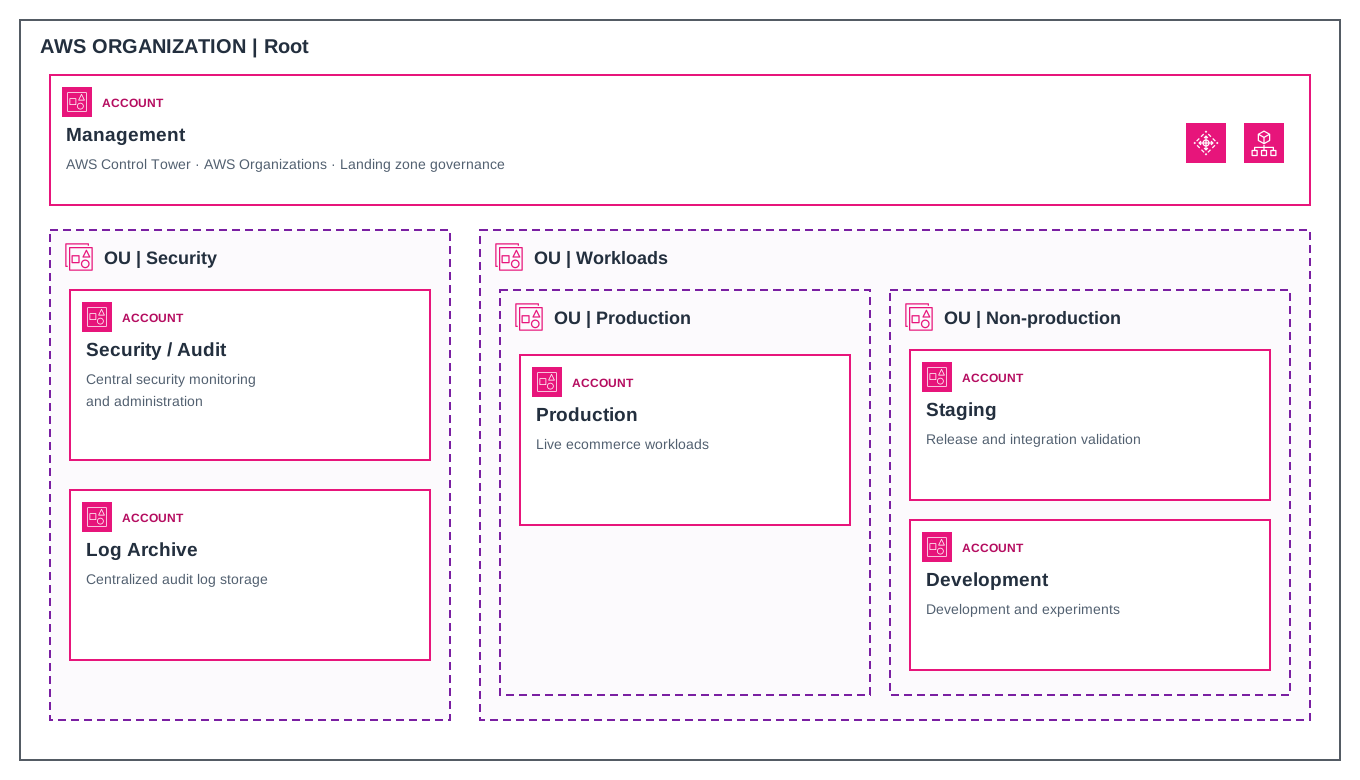
Figure 1. The six accounts used for the e-commerce platform. The OU layout groups them based on governance needs.
Staging solved a challenge in the release process. Development had to keep moving while the team checked a specific release. A separate Staging account gave us a stable place to do that without slowing down development.
We used GitHub Actions for CI/CD, so we didn’t need a separate AWS account for builds and deployments. Cloudflare managed DNS, so there was no separate Network account. Experiments happened in Development, using its existing access and data limits.
These choices kept our supporting infrastructure simple. We didn’t have any extra isolation or ownership needs that would require dedicated CI/CD, Network, or Sandbox accounts.
The number of storefronts and integrations affected how we designed the app and tested releases, but it wasn’t a good way to decide how many accounts we needed. A new campaign storefront or shipping provider could fit into the current setup.
I’d reconsider the boundaries if a storefront became its own product, or if an integration brought in sensitive data or privileged access that needed separate controls. For example, a payment component handling cardholder data might need its own account. Its PCI DSS scope would still depend on real data flows, access paths, and how well things are separated. PCI SSC guidance on segmentation
Apply Security Controls Without Making Delivery Unpredictable
When a team releases a storefront, they should know if their pipeline can deploy the change, if they can check the release in Staging, and who can troubleshoot issues in Production. I set up access and controls to support these workflows.
Give People and Pipelines Appropriate Access
In an e-commerce setup like ours, I’d use IAM Identity Center to give access through groups and permission sets. Developers could deploy and troubleshoot in Development, check releases in Staging, and read logs in Production. Only deployment roles and certain operators would get write access in Production.
We used GitHub Actions for CI/CD. For this setup, I recommend OpenID Connect so workflows assume AWS roles with temporary credentials. Each environment should have its own deployment role, scoped to the resources it deploys. For Production, restrict the trust policy to the intended repository and GitHub environment, then configure that environment’s deployment protections. Development workflows should be configured to assume only the Development deployment role. GitHub Actions OIDC in AWS
Cross-account access needs the same precision. If Staging pulls a release image from an Amazon ECR repository in another account, grant its deployment role access to that repository through the repository policy and give the role the required IAM permissions. When a workflow assumes a role across accounts, restrict the target role’s trust and permissions to the intended caller and task. AWS cross-account policy evaluation
Match the Control to the Risk
Control Tower uses three types of controls.
- Preventive controls block prohibited actions through mechanisms such as SCPs, RCPs, and declarative policies.
- Detective controls identify noncompliant configurations through AWS Config rules.
- Proactive controls use CloudFormation hooks to check supported resources before provisioning.
How you deploy matters. A proactive control set up with CloudFormation hooks only covers resources created that way. Teams using other deployment methods need to check their control coverage separately. AWS Control Tower control behavior
SCPs limit permissions available to principals in member accounts. An SCP can prevent a Development role from disabling an audit service even if its IAM policy would otherwise permit the action. SCPs have exceptions, including service-linked roles. AWS service control policies
RCPs limit access to resources in member accounts for supported services, including requests from outside the organization. An appropriately configured RCP can restrict access to a production S3 bucket even if its bucket policy is later broadened. Consider and test legitimate partner access and AWS service integrations. AWS resource control policies
SCPs and RCPs set permission limits, but you still need to grant access through IAM and resource policies. SCPs don’t limit management account users, and RCPs don’t limit management account resources. I keep privileged access to that account tightly controlled, protect its root credentials, and run regular app deployments in member accounts.
I add controls as production changes happen. Each control has a documented risk, scope, expected effect, and owner. I test that it blocks the right actions while deployment, rollback, integrations, and logging still work. Then I roll it out in stages with a recovery plan. If a deployment gets AccessDenied, the team should know what changed and who can help fix it.
Centralize Logs and Security Visibility
If checkout failures go up after a release, the team needs to find out where orders are failing, what changed, and if anything suspicious needs to be checked. Application telemetry, CloudTrail logs, and security findings each give part of the answer.
- Log Archive stores and protects audit records. Delivery services receive the permissions needed to write logs, while access and deletion permissions are tightly restricted. Where records require protection from deletion for a defined period, configure retention controls such as S3 Object Lock.
- Security / Audit helps with monitoring, investigation, and response. It can also act as a delegated admin for services like GuardDuty if set up that way.
- Workload teams are responsible for application logs and product diagnostics. In e-commerce, this means tracking checkout, payment callbacks, and order handoffs. Correlation IDs help trace transactions without putting sensitive data in the logs.
Separating protected storage from security operations follows the AWS Security Reference Architecture.
A CloudTrail organization trail collects data across accounts. By default, trails capture management events. To track who read or deleted objects in a sensitive S3 bucket, set up the right data event configuration. Business events like declined payments or failed warehouse handoffs need to be sent and collected by the app or integration that sees them. AWS CloudTrail concepts
I pick events based on the questions the team needs to answer. For checkout availability, we monitor errors and latency, with enough detail to look into failed requests. If someone might have accessed an order export, we need the right data access records. We also monitor log delivery so we catch missing audit streams before there’s a problem.
Retention works the same way. Keep recent operational logs easy to find, and move older audit records to cheaper storage if slower retrieval is okay. Collecting, storing, and querying data all cost money, especially with lots of data. Extra requirements, like PCI DSS, can affect what you need to record and how long you keep it.
Enterprise: Add Boundaries When the Operating Model Requires Them
Imagine a company where Commerce and Fulfillment are run as separate products. Each team manages its own releases and production issues. Both use shared company networks, but one workload needs stricter access controls for its data.
I would keep the Control Tower setup and add boundaries only where the teams’ responsibilities or needs are different.
| Business need | Architectural development |
|---|---|
| Independent products and teams | Separate workload accounts for the environments each product operates |
| Different data and access requirements | Dedicated accounts and, where controls differ, a Restricted Production OU |
| Shared corporate connectivity | A Network account with explicit ownership of shared connections, routing, DNS, or egress |
| Services used by several teams | Shared Services accounts with defined owners, consumers, and support responsibilities |
| Regular account provisioning | Account Factory customization and, when justified, AFT for reviewed provisioning and customization workflows |
| Delegated operational responsibility | Service-specific delegated administration in designated member accounts |
| Changes to governance itself | A representative test OU for scoped changes and a separate test organization for organization-wide changes |
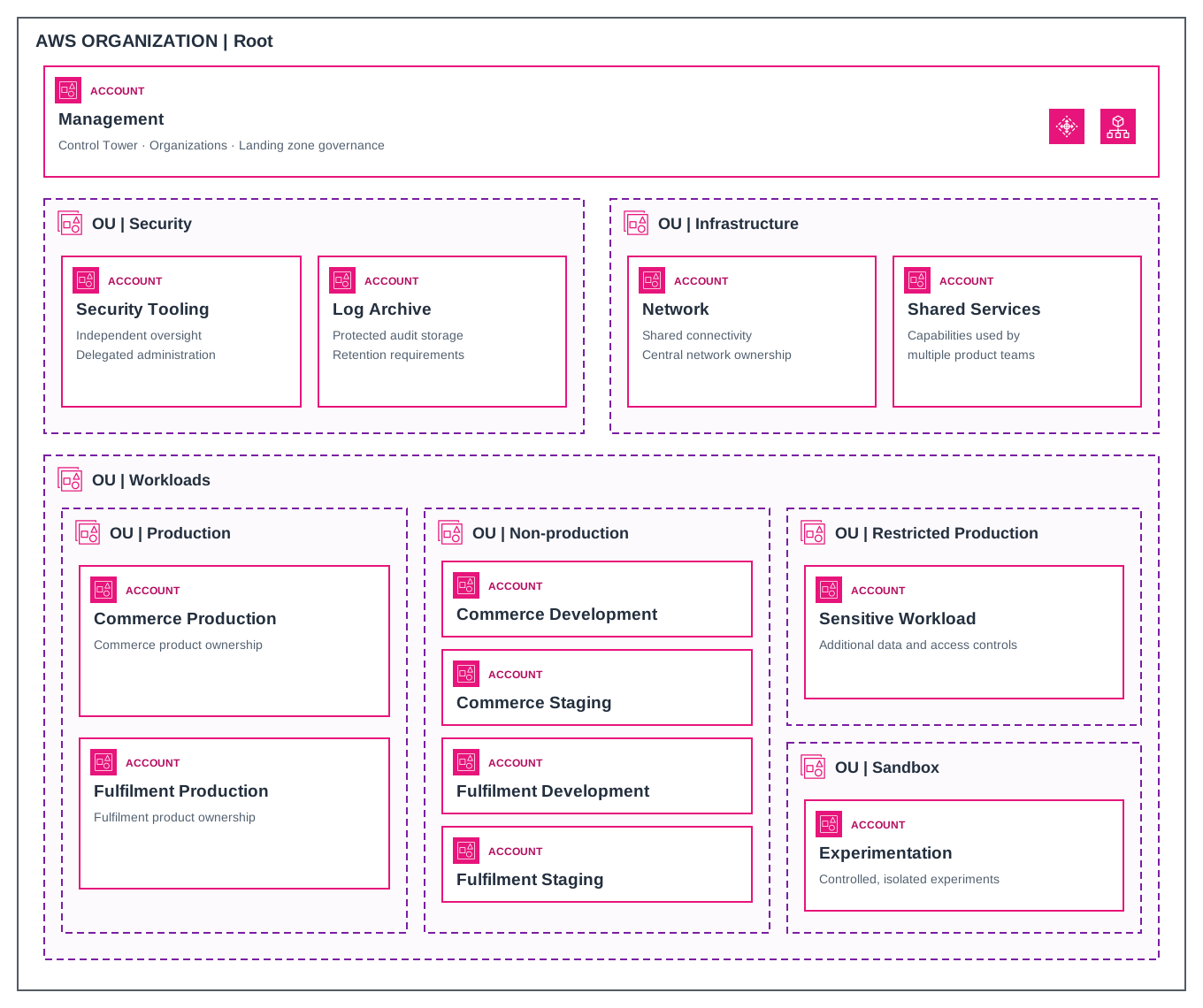
Figure 2. A sample enterprise setup. Security accounts keep oversight and audit storage apart. Infrastructure accounts handle shared networks and services. Workload accounts split up product ownership and environments, with extra boundaries for sensitive workloads and experiments.
AFT helps with provisioning and customization using a Terraform pipeline and adds its own management account. I would use it when you need repeatable setups and review processes that make the extra infrastructure worthwhile. AWS Account Factory for Terraform
Keep the OU Structure Shallow
I use accounts to split up ownership and access, and OUs to group accounts that need the same controls. Commerce and Fulfillment production accounts can share a single Production OU if they use the same controls.
Add a new OU layer only if there’s a long-term governance reason. AWS also suggests organizing OUs by security and operational needs, and keeping hierarchies as shallow as possible. AWS multi-account design principles
I usually use one organization for live workloads so I can manage policies and service settings in one place. You should only add a second organization for live workloads if there’s a clear reason, like a planned divestiture, separate billing, or a data boundary that includes organizational metadata.
A separate test organization has a different role. It lets you try out organization-wide governance changes before you roll them out to live environments. AWS guidance on multiple organizations
Keep the Landing Zone Operable
When a team asks for an account, the platform team should be able to set it up, check its configuration, and hand it over without needing help from whoever set up the landing zone in the first place.
Here are the steps I include in the account lifecycle.
- Record ownership. Keep track of each account’s owning team, its purpose, OU, and expected baseline. Assign someone to own each organizational control and policy.
- Verify enrollment and baseline status. Make sure provisioning finished successfully and that all expected resources and controls are in place before handing over the account.
- Check control coverage. Preventive controls can cover child accounts, even those not enrolled. For nested OUs, you need to enable detective and proactive controls separately. AWS Control Tower nested OUs
- Complete updates across accounts. A full Control Tower update covers the landing zone and all enrolled accounts. Track which accounts are done and check the affected workflows. Once you finish a landing zone update, you can’t roll it back, so make sure your recovery plan accounts for that. AWS landing zone updates
- Route drift to owners. Investigate the cause and use the remediation procedure for the affected configuration. Landing Zone 4.0 sends drift notifications through EventBridge in the management account, which requires routing rules and targets. AWS governance drift
- Treat OU moves as policy changes. Compare effective SCPs, RCPs, baselines, and controls before a move. Afterward, verify enrollment and check deployment, rollback, integrations, and security monitoring. Auto-enrollment behavior depends on configuration, and differences between source and destination OUs can require remediation. AWS account moves and auto-enrollment
- Review permissions and exceptions. Check access when ownership changes and on a regular schedule. Every exception should have a business reason, an owner, a clear scope, and a review or expiry date.
As the account inventory grows, I automate checks with clear expected results, such as missing owners, failed enrollments, baseline drift, and overdue exceptions. Teams can then spend their time resolving deviations and evaluating changes that affect the business.
A Decision Checklist Before Adding Another Account
Once the foundation is in place, I ask the team suggesting a new account to answer six questions.
- What business need does it serve? Explain the goal, like enabling independent product releases or better protection for sensitive order data.
- What risk does it contain, or what responsibility does it separate? Describe which failure, access path, or operational duty needs its own boundary.
- What needs to differ? List the controls, owners, or deployment permissions that would be different.
- What cross-account dependencies will it introduce? Point out the services, pipelines, and teams that need access across the boundary, and who will manage those connections.
- Who will operate it? Name the team that will handle access, monitoring, costs, and keeping the baseline up to date.
- When should the decision be revisited? Decide on a trigger, like a change in ownership, a new data need, or repeated release conflicts.
These answers give the team a clear way to weigh the benefits of separation against the effort needed to run the new account.
Architecture That Grows With the Business
The e-commerce project shows how much you can do with a simple structure. Six accounts let us develop and test while keeping production, security, and audit records separate. You could add another storefront or shipping integration to the same setup.
I start with AWS Control Tower and separate production from non-production at the account level. Then, I let business changes decide where to add new boundaries. If Fulfillment turns into its own product with a separate team, release process, and responsibilities, giving that team its own accounts makes sense. The extra work of managing access, controls, and dependencies is worth it when it supports a business need.